logo, Blue Hare Software   Blue Hare Software 
Announces Building and Store Directories

StoreDir map, Blue Hare Software.


Imagine a store that operates 6:00 AM. to Midnight (18.0 hrs/day), the hardlines personnel are in the store 8:00 AM. to 9:30 PM, (13.5 hrs/day). This is 4.5 hours daily (about 1630 hours per year) when no one can easily help a customer. In a 24 hour operation, the numbers are more significant. In addition, when you add in the hours from interruptions of personnel answering "Where is ....?" all day, the total hours lost can be staggering . If this is the situation you need StoreDir .

If you have even one customer per month leave the store without finding what they are looking for even though it is an in stock item, you need
StoreDir !

If you do not have personnel nor resources to have adequate customer service at all hours, you need
StoreDir !

StoreDir aids shopping as most customers will not use StoreDir except when they cannot find a specific item.

StoreDir does not eliminate browsing.   Indeed , StoreDir will cause the customer to pass ends and promotional displays.

Most of the items in the store are like soup, if a type of soup is requested the general location for soup is shown on
StoreDir's map .

In Achieving Excellence Through Customer Service by John Tschohl, President of Service Quality Institute , it shows that if each store, in a 100 store chain, lost only one customer per day the loss estimate would be $94.4 million per year. If your situation is similar then you need
StoreDir .

Return Home
click here

bbar.gif

Building directories may have maps, but generally the maps are much more simple and on a floor by floor basis. The database editor is the same as StoreDir's.

bbar.gif StoreDir Specifications


As stores get larger with a wider variety of products the amount of frustration exhibited among some customers trying to find products increases. StoreDir's purpose is to help you reduce this reaction significantly.

StoreDir's is an interactive customer service store directory designed to be easy customer use and and as an aid for your employees helping customers. Several variations are available for retail stores with 40,000 to over a million SKUs.


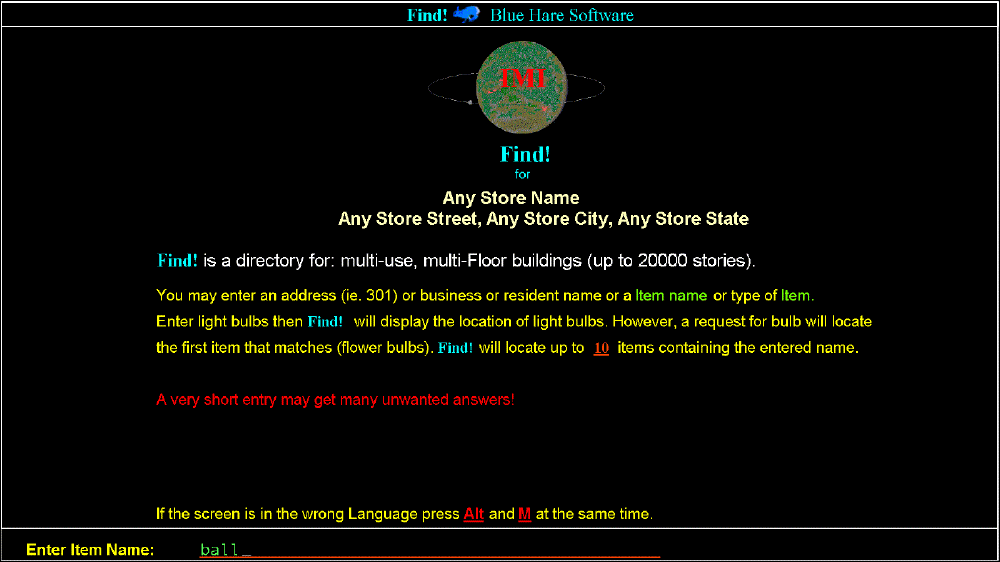
 First Customer Screen Click image for 1280x1024x256 image
Customer Screen1
StoreDir will partially relieve your clerks of the task of giving directions to so many customers unfamiliar with product locations.

The customer may press MAP without any other entry or may enter: brand or common name of a product. After this entry
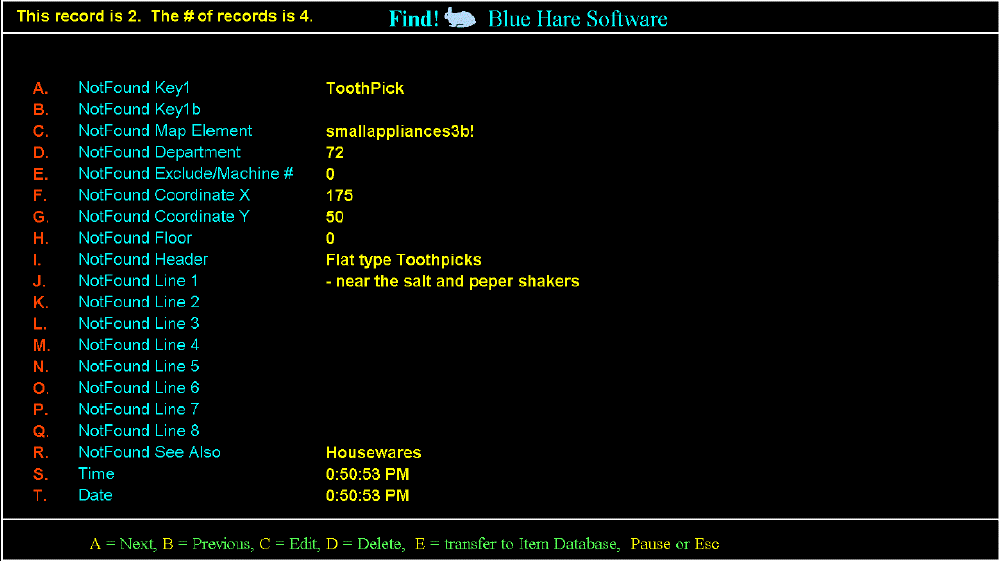
StoreDir will: Display a screen containing up to 8 lines of location and "See Also" information to aid the customer for a more detailed search. Batteries often have four primary locations depending on their type; Electrical, Auto, Electronics and Jewelry. Next and Previous (Up and Down) keys are available for finding similar products. The number of Next/Previous operations is limited to avoid a single customer tying up your system.


Product found screen Click image for 1024x768x256 image
Customer Screen2 Customers have access to the product database without the ability to change your data.

If no exact match with the customer's entry, a message will display, telling the customer that their initial entry has been saved and the system is trying to find that product.
StoreDir will try a partial key search. After the first pass through the keys the entry will be shortened then the search will repeat. StoreDir will always find something, at least a screen thanking the customer for using your store's system.  


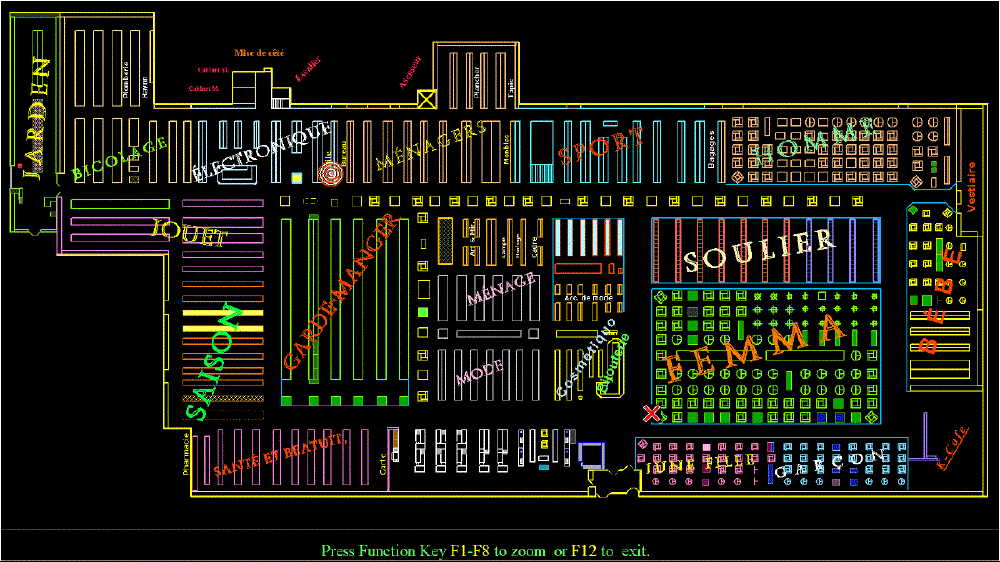
Version 2 Store map with locations, Click image for 1024x768x256 image This is an actual map of a Big K Store A map of a store A map of your entire store will appear at the press of a key (MAP), displaying the location of the StoreDir station, the location of the product and labeling the main departments within the store. A "Bull's Eye" defining the product's location and an "X" where the kiosk is located. These are blinking, red and white for high contrast enhanced for color blind customers. The DETAIL key displays a detailed section map (1/5th to 1/70th of the full map), for the area around the product.


Version 2 Zoomed Map of product area, Click image for 1024x768x256 image. This is an actual map of a Big K Store A zoomed map of a store

Protection: StoreDir's roll about kiosk with lockable casters has a sloped top for liquid and physical damage resistance, flush mounted keyboard and enclosed monitor. The computer should be mounted inside the base of the cabinet behind a lockable door. The program has been designed to recover from power failures and will prevent customers from interfering with your system, (Neither the computer nor the kiosk are provided, however we will provide specifications, designs and have identified sources of all the components.)

All unused keys are disabled to prevent misuse of or playing with the your system.


The
StoreDir system is eight programs with six integrated databases and several files. StoreDir - the "customer program". SDmenu - a utility with selections for Backup, Restore, Reorganize the main file, Calendar for reference usage and access to both StoreDir and StoreED .

A variation of the editor
StoreEd may be supplied on a disk instead of resident on the computer. However the editor is normally a hidden file which is heavily passworded so only authorized personnel may access its functions.

The editing program,
StoreEd , after password entry allows an employee to: Edit the product database; add or modify access flags; Modify product location, wording and layout, copy a Product or Shelf. A calculator that will place the answer in an entry field if desired. Test the graphic customer screen and location on the map. Enable or disable display of certain groups of products like seasonal or sale items. Shelves may be listed by Department or Shelf Number.

Plan-o-grams , They are great when first laying out the map. However with
StoreDir the product locations are in human terms, "Soup is in isle 6 about halfway down on the right!"

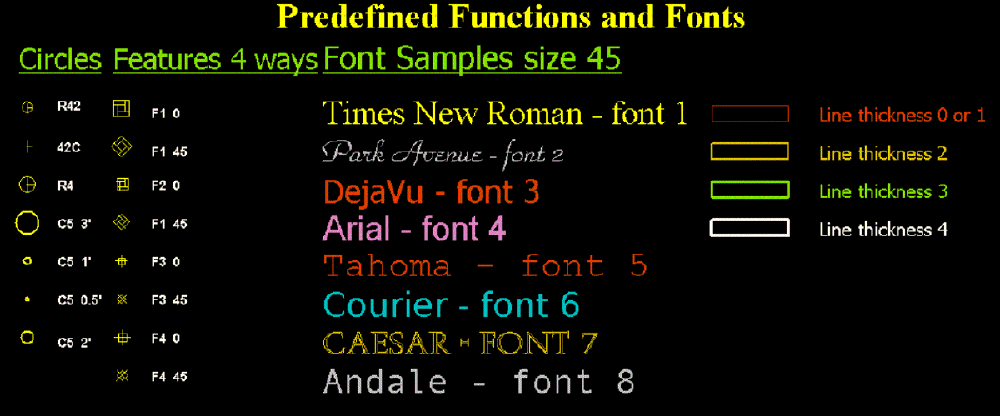
NEW : Functions for store fixtures of five types and several sizes, placed on the map with
only one screen (not multiple scereens) . These features include: Rounders , 4-Ways and other types of hard line and soft line display fixtures for normal (90°) and 45° angles, solid lines or filled with color and/or pattern. Also we have added three fonts in eight preselected sizes and one large size

If there is room on the screen the above graphic and help screens below may be on the editor side. The fill styles below may be used on shelves and features.

features


StoreEd the store map generator (additionally passworded ) (Wall, Shelf and Label) with full editing features. It allows editing and testing features for angle, position and color. A pseudoshelf (Electronic Shelf Paper, "ESP") is a section of/or a shelf with length only, in a different color as the shelf of which it is a part and can only be seen with the editor. Hide or Unhide a shelf or "ESP" and all products associated with it. The entire floor plan of the store may designed using only the keyboard as the map is a database, however, we recommend Blue Hare Software set up your original map. The editor is useful for seasonal or in-out items, these shelves may be as small as two to four feet long an may have up to 1,000 associated items. Move and/or Rotate a shelf or "ESP" and its associated items to another location. Inquiries saved in a "Not Found" database which may be used for marketing and/or to add/edit a product. Utilities for restructuring all three major databases.

The size of
StoreDir's main data file is large enough to hold the locations and data for a billion products. This number of records is unnecessary. Many variations of one type will often be in more than one location. Examples of some of these are: batteries, light bulbs, motor oil, screws, cosmetics, pantyhose, cereal and ladies dresses. Access to a 275 character key structure speeds searches and will allow multiple products to be listed in one location (Screws, Spices, Soups and etc.) This is how StoreDir is able to access millions of products.


A flag (ABC!@#$%^&*+...) will allow display of seasonal products or or shelves, those only available some of the time may be flagged and will be skipped on customer searches. These flags and Hide/Unhide shelves allow flexibility with little loss of speed. Departmentalization may be used editing to speed access to many products.

The original software and your initial data files will be retained at
Blue Hare Software .

StoreDir's initial product data file of 100 sites each with 1 to 100 products, (average 4-6 per site), all attached to pseudoshelves, the store's logo and a complete documented map system will be supplied upon installation.

Upgrades are free for one year from final installation. This includes bug fixes or new versions . The Databases may be saved by StoreDir in an encrypted ASCII format that may be imported to versions using a different database.

If
Blue Hare Software is to maintain files or maps: A Fax/modem with an on/off switch, should be used to speed up turn around for changes of maps or data.

If you order StoreDir a demo will be sent on a CD with the manual and and notes, the upgrade is Free !

StoreDir is "Site Licensed". ie. Copies of the program may on many computers at one location (same store name and address).

Our Current versions of StoreDir now runs on Windows 98© Windows Xp© to be tested on Vista© and a version for is in the future. StoreDir can convert the present databases to encryped ASCII for upgrades to the newer versions when available.

bbar.gif


Read the manual for StoreDir, Version 2.2 bbar.gif click here

References for Store Directories and on customer service. bbar.gif click here

Information on pricing versions bbar.gif click here

Take a tour of StoreDir's Editor: bbar.gif click here

Editor FREE, StoreDir Demo program is available, a screen tester Download demo, Awards, and links bbar.gif click here

Return home bbar.gif click here

Contact Us bbar.gif click here

bbar.gif

goto top


Valid XHTML 1.0 Transitional


Website by Blue Hare Software
Free JavaScripts provided
by The JavaScript Source


http://www.blue-hare.com/prod1/nframes.html


Copyright © 1999-2008 Blue Hare Software